
WPThumbs
Themes Plugins By purpose By industry Best-of lists Fix it guides
Free Plugin by ZephyrWest v5.0.0

Category Posts Block

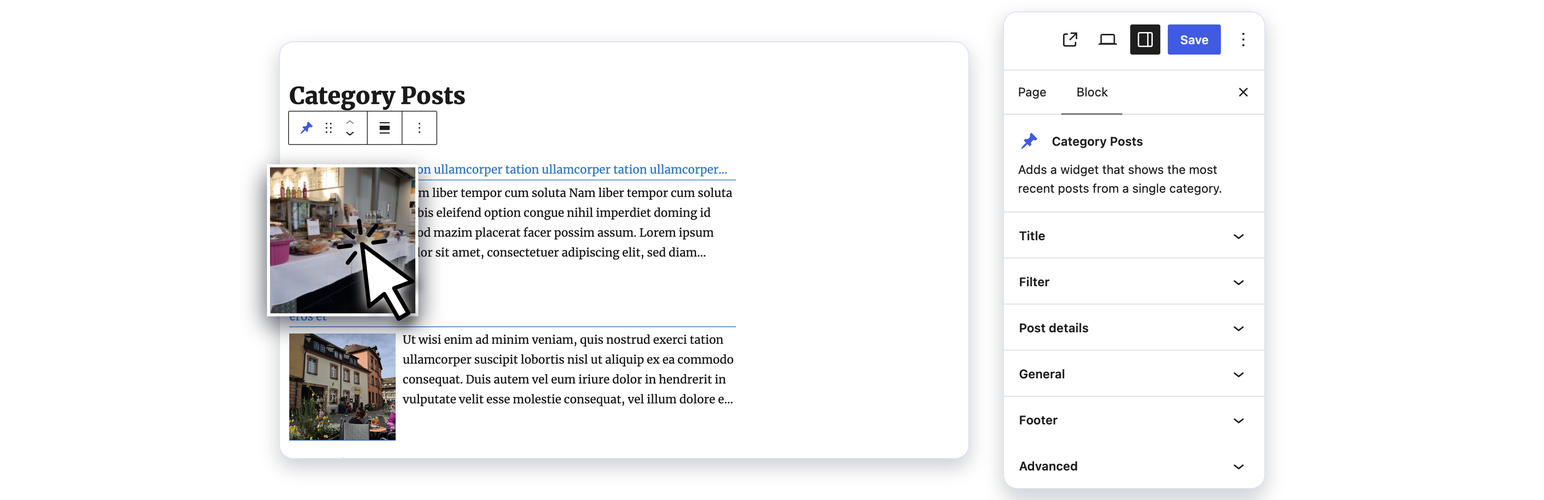
Adds a block that shows the most recent posts from a single category.
Category Posts Block

The facts

Rating
4.5★ from 79
Active installs
40k+
Price
Free
Last updated
21 Aug 2026
Added
Oct 2007
Requires WP
2.8
Tested up to
WP 7.1
Requires PHP
5.3
Downloads
1,817,091

Our analysis

AI-assisted

Category Posts Block is a WordPress plugin that allows you to display the most recent posts from a specific category using the Gutenberg editor. You can place the post list anywhere in your content and customise its appearance through various options available in the block sidebar.

This plugin is suitable for users looking to enhance their site with category-specific content. It provides features like a 'Load more' button, date range filters, and options for displaying post details, making it useful for blogs and news sites that want to highlight recent posts from selected categories.

Best for: This plugin suits bloggers and site owners who want to showcase recent posts from specific categories.

What it does well

  • Displays recent posts from a specific category
  • Customisable through the Gutenberg editor
  • Supports multiple blocks on the same page with unique settings
  • Includes a 'Load more' button and various filter options
  • Full documentation available

Where it falls short

  • Limited information on premium features
  • No mention of support for custom post types in the free version

Verdict

Category Posts Block is a straightforward tool for displaying recent posts by category, ideal for users wanting to enhance their content layout without complexity.

From the developer

ZephyrWest's own description of Category Posts Block, lightly tidied.

Category Posts Block is a light block designed to do one thing and do it well: display the most recent posts from a certain category.

Category Posts Block

Use the “Category Posts” block in the Gutenberg editor to place the post list anywhere in your content. All options are available in the block sidebar panels: Title, Filter, Details, Thumbnail, Excerpt, Footer, Load more and General. Several blocks can be used on the same page, each with its own settings.

Term and Category based Posts Block

A premium version of that free block available at tiptoppress.com created for big WordPress sites.

Premium features

  • Auto-sizing Grid layout
  • Custom field support in the Template
  • Shortcode support in the Template
  • Image-Slider (or News-Ticker)
  • Asymmetrical list layouts
  • Full background images
  • Masonry responsive grid layout
  • More complex filter (ANY, NOT, AND, …)
  • Custom Post Types, Events, Products support
  • All free features
  • E-Mail support
  • More examples on the demo pages

Features

  • Block for the block editor and Site Editor.
  • Template to arrange the post details.
  • The Template text can be a post details placeholder, plain text, HTML or a font-icons.
  • Font-icon support
  • ‘Load more’ button / Ajax API
  • Item Title heading level buttons
  • Excerpt length and item title in lines (line-clamp)
  • Date range filter
  • New date format: Time since plublished
  • Filter by post status: Published, scheduled, private
  • Add option for post offset (use two or more widgets after another)
  • Admin UI: Buttons in the editor toolbar to insert shortcode
  • Option to touch device friendly “everything is a link”
  • Set thumbnail width & height / image crop with CSS (object-fit)
  • Fluid images (max-width in %)
  • One thumb dimension can be left empty
  • Option to set mouse hover effects for post thumbnail
  • Set a default thumbnail
  • Hide widget text or text, if there is no post
  • Option to hide posts which have no thumbnail
  • Option exclude current post
  • Option show post author, comment’s count, post date
  • Admin UI: Set / find thumbnail size buttons: +, ¼, ½, 2x, -, ratio and Media sizes
  • Admin UI: Buttons to easy add post details placeholder

Documentation

Contribute

While using this plugin if you find any bug or any conflict, please submit an issue at
Github (If possible with a pull request).

Read the full description on the official page →

Tagged as

Alternatives

Other plugins for customising wp-admin.

SEOPress

WordPress SEO plugin with AI SEO metadata, schema, XML sitemap, redirections & Search Console. Privacy-fir...

Free 300k+ installs 4.8★ (1,246)
Admin and Site Enhancements

Duplicate post, post order, image resize, email via SMTP, admin menu editor, custom css / code, disable gutenb...

Free 200k+ installs 5★ (421)
Custom Post Type UI

Admin UI for creating custom content types like post types and taxonomies

Free 1M+ installs 4.6★ (276)
LoginPress

LoginPress is a Custom Login Page Customizer plugin allows you to easily customize the layout of login, admin...

Free 200k+ installs 4.8★ (1,075)
Admin Menu Editor

Lets you edit the WordPress admin menu. You can re-order, hide or rename menus, add custom menus and more.

Free 300k+ installs 4.6★ (312)
White Label CMS

Customise dashboard panels and branding, hide menus plus lots more.

Free 200k+ installs 4.7★ (113)