
Members
94The best WordPress membership and user role editor plugin. User Roles & Capabilities editor helps you rest...
Free
300k+ installs 4.9★ (1,274)
Build sets of products to import into your website.
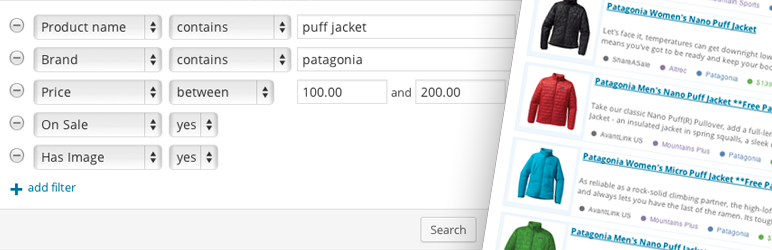
Datafeedr Product Sets is a WordPress plugin that allows you to create collections of related products, known as Product Sets, which can be imported into your WooCommerce store. It connects to the Datafeedr API to search for products based on specific keywords and enables you to choose which products to include in your set. Once created, the plugin updates the imported products at a configurable interval, ensuring your store reflects the latest information.
This plugin is suitable for users who want to manage affiliate products in their WooCommerce store efficiently. It requires the Datafeedr API plugin and the Datafeedr WooCommerce Importer plugin to function properly.
Best for: This plugin is best for WooCommerce store owners looking to manage affiliate products.
What it does well
Where it falls short
Datafeedr Product Sets provides a structured way to manage and update affiliate products in WooCommerce, but it relies on additional plugins for full functionality.
datafeedr's own description of Datafeedr Product Sets, lightly tidied.
NOTE: The Datafeedr Product Sets plugin requires the Datafeedr API plugin.
What is a Product Set?
A Product Set is a collection of related products. Once you create a Product Set, the products in that set will be imported into your website (via an importer plugin). The Product Set is also responsible for updating those imported products with the newest information at an interval you choose.
The Datafeedr Product Sets plugin currently integrates with the following plugins:
How does it work?
Create a new Product Set by performing a product search for specific keywords. In this example lets use “rock climbing shoes” as our keywords.
The Datafeedr Product Sets plugin connects to the Datafeedr API and makes an API request querying 250 million affiliate products in the Datafeedr database for the keywords “rock climbing shoes”.
The Datafeedr API returns the products in the database that match your search keywords.
At this point, you have 2 choices: You can “save” your search (so that all products returned are added to your Product Set) or you can pick and choose specific products to add to your Product Set.
After your Product Set has some products in it, you choose what WordPress Post Type and Category to import the Product Set into. For example, you could import all of the rock climbing shoes into your WooCommerce store in the “Climbing Shoes” product category.
Within a few seconds the Product Set will attempt to import those products into your WooCommerce product category. It will do so by getting all of the products in the Product Set and passing them to an importer plugin (in this case the Datafeedr WooCommerce Importer plugin).
After a few minutes (depending on how many products are in your set and your update settings) your “Climbing Shoes” product category will be filled with products from your Product Set.
Lastly, at an interval you configure, the Product Set will trigger a product update. At this time, products no longer available via the Datafeedr API will be removed from your WooCommerce store, all product information will be updated and any new products that match your “saved search” will be added to your store.
The Datafeedr Product Sets plugin requires at least one importer plugin to import products from a Product Set into your blog.
We currently have one importer which imports products from your Product Sets into your WooCommerce store: Datafeedr WooCommerce Importer plugin. Additional importers will be developed over the coming months. Custom importers may also be written. Product Sets can be imported into one or more WordPress Post Types.
Requirements
CURL enabledOther plugins for moving data.
The best WordPress membership and user role editor plugin. User Roles & Capabilities editor helps you rest...

Manage all your WordPress updates, including individual updates, automatic updates, logs, and loads more. This...

Redux is a simple, truly extensible, and fully responsive options framework for WordPress themes and plugins....

🌠 Shorten, brand, and track any URL on your own domain. Keep your links — and your data — where they belong....

Export WooCommerce orders to Excel, CSV, XML, JSON, PDF and HTML. Best free order export plugin for WooCommerc...

Easily export or import your WordPress customizer settings!