
WPCode
93Easily add code snippets in WordPress. Insert header & footer scripts, add PHP code snippets with conditio...
Free
3M+ installs 4.9★ (1,873)
Debug Bar Cron adds a new panel to Debug Bar that displays information about WP scheduled events.
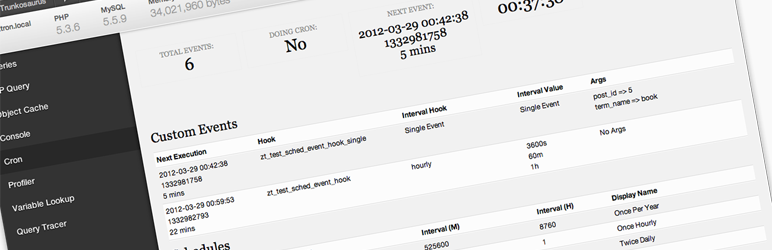
Debug Bar Cron is a WordPress plugin that adds a panel to the Debug Bar, providing information about scheduled events in WordPress. It displays the number of scheduled events, whether cron is currently running, the time of the next event, the current time, and lists of both custom and core scheduled events.
This plugin is intended for developers or site administrators who need to monitor and debug scheduled tasks within their WordPress site. It requires the Debug Bar plugin to function properly.
Best for: Developers and site administrators who need to manage scheduled tasks in WordPress.
What it does well
Where it falls short
Debug Bar Cron is a useful tool for those who rely on scheduled events in WordPress, but it has limitations due to its dependency on another plugin.
Zack Tollman's own description of Debug Bar Cron, lightly tidied.
Debug Bar Cron adds information about WP scheduled events to a new panel in the Debug Bar. This plugin is an extension for
Debug Bar and thus is dependent upon Debug Bar being installed for it to work properly.
Once installed, you will have access to the following information:
Other plugins for developer tooling.
Easily add code snippets in WordPress. Insert header & footer scripts, add PHP code snippets with conditio...

Easily add tracking code snippets, conversion pixels, or other scripts required by third party services for an...

Duplicate post, post order, image resize, email via SMTP, admin menu editor, custom css / code, disable gutenb...

Create custom "Shortcodes" easily for HTML, JavaScript, CSS code snippets and use the shortcodes wit...

Add PHP code to your pages and posts easily using shortcodes.

An easy, clean, and simple way to enhance your site with code snippets.