
Popup Maker
94Want to boost sales & marketing efforts? Use your favorite forms & builder. Unlimited popups & imp...
Free
700k+ installs 4.9★ (4,504)
Free shipping bar will show a notification bar/popup on your website with a free shipping progress bar that will inform users how much they should buy …
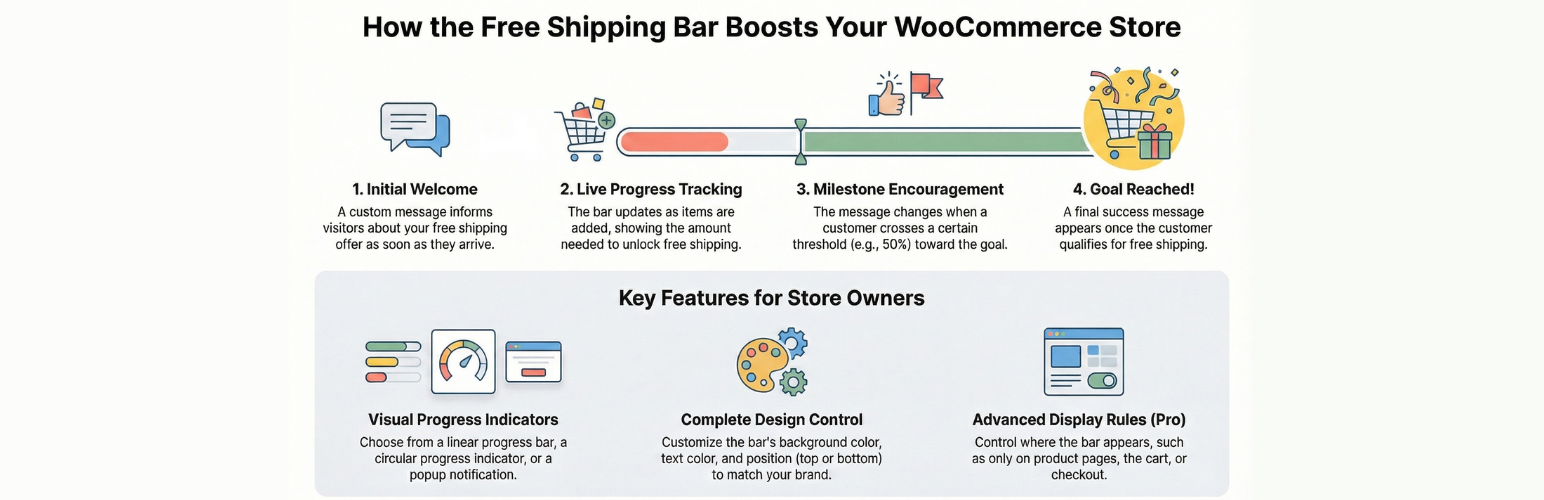
Free Shipping Bar for WooCommerce is a WordPress plugin that adds a notification bar to your WooCommerce site, informing customers about free shipping offers based on their cart total. It features a live counter that updates as users shop, showing their progress towards qualifying for free shipping.
The plugin allows you to customise messages displayed at different stages of the shopping process and adjust the design of the bar. It is suitable for WooCommerce store owners looking to enhance the shopping experience and encourage higher cart totals through free shipping notifications.
Best for: WooCommerce store owners wanting to promote free shipping offers effectively.
What it does well
Where it falls short
This plugin provides essential functionality for encouraging purchases through free shipping notifications, making it a practical choice for online store owners.
PI Web Solution's own description of Free Shipping Bar for WooCommerce, lightly tidied.
Free shipping notification bar plugin for WooCommerce will show a notification bar on your site that will inform your users that you have free shipping available when shopping for X amount. It will also show a live counter as they shop, so the buyer will know as they become eligible for free shipping
Here are a few of the options that you get with the plugin
Change design of the bar from within the option:
Change background color
Change text color
Change bar position
In the Pro version, you can add a bar to your desired location using the shortcode [free_shipping_notification]
body.pisol-bar-open{ padding-top:40px; }
When the bar is visible, it adds a class name pisol-bar-open to the body of the page so you can leave some extra spacing at the top so your menu shifts down when the bar is visible. Example: you can add this CSS to add 40px padding from the top when the bar is visible. Add the below CSS in your site Appearance > Customizer > Additional CSS
body.pisol-bar-open{ padding-top:40px; }
So this padding of 40px will be applied when the bar is visible, and it will be removed when the bar is hidden
FEATURES:
If you choose to opt in from the plugin settings, or submit optional feedback during deactivation, this plugin may collect basic technical information, including:
This data is used solely to improve plugin quality, compatibility, and features. No personal or user-specific data is collected without consent.
Other plugins for popups and optins.
Want to boost sales & marketing efforts? Use your favorite forms & builder. Unlimited popups & imp...

Formerly Easy Fancybox. The most popular WordPress lightbox plugin. Simple, fast, and responsive. Opens images...

Create a welcome notification bar for your website. Also, My Sticky Bar plugin can make your menu or header st...

Build Stunning Slider and Popup. Exit intent Popup, Image slider carousel, video slider carousel, post slider...

Free email automation, email campaigns, exit intent popup builder, gamified popups with spin the wheel, contac...

🤩 Make popups & optin forms to get more email newsletter subscribers, leads, and sales - #1 most popular...