
Members
94The best WordPress membership and user role editor plugin. User Roles & Capabilities editor helps you rest...
Free
300k+ installs 4.9★ (1,274)
This plugin will limit the number of comments and the word count each user can add to a WordPress blog post, configurable by user role and time.
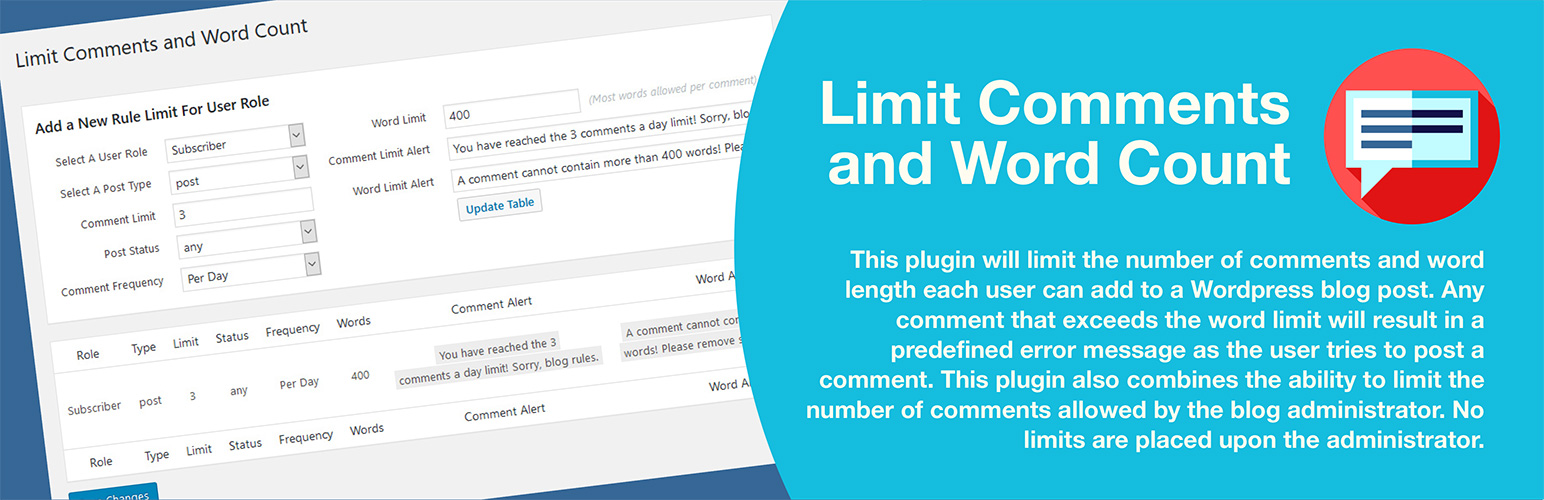
Limit Comments and Word Count is a WordPress plugin designed to help manage user comments by providing real-time feedback on character and word counts. It allows administrators to set limits on the number of comments a user can make over specified time periods, and restricts comments that exceed a defined word limit. The plugin is aimed at blog administrators who want to enforce commenting rules for registered users while maintaining a straightforward user experience.
The plugin features an active counter for letters, words, and comments, and provides alerts when limits are reached. It is compatible with various membership platforms and allows for custom rules based on user roles. However, it does not monitor unregistered users or anonymous comments, focusing solely on registered user activity.
Best for: Blog administrators who want to manage user comments effectively.
What it does well
Where it falls short
This plugin offers useful features for controlling comment activity among registered users. It is straightforward to implement but may not suit sites with unregistered commenting.
artiosmedia's own description of Limit Comments and Word Count, lightly tidied.
This plugin adds an active letter counter, word counter, and comment counter above the comment box, providing users with constant visual access to their input activity. Any comment that exceeds the word limit will result in a red change in its count as the user types more words. If users try to post anyway, a warning dialogue will appear below the comment box stating the limit, and the comment will not post. Once the user edits the words that exceed the limit, the comment can be posted. User types are defined when a rule is created, allowing a rule to restrict a specific user type. Multiple rule types can be made if different rules are required.
The plugin never restricts or limits the WordPress default user types Administrator, Editor, Author, and Contributor. If the blog administrator creates a rule for any of the three roles (Editor, Author, or Contributor) separately, that rule supersedes the default setting. Other user types that may appear in the user type dropdown do not default to WordPress and would require a rule to be created if limits are needed.
This plugin also allows the blog administrator to limit the number of comments. The defined limit applies to each day, week, month, or year. Once the limit set by the selected time span is reached, an alert message explains why further comments are not allowed.
The plugin settings allow you to disable the default WordPress flood protection notice, which blocks a user from quickly submitting successive posts and results in a 404 error. Additionally, a user is blocked by default from pasting the same comment, letter-for-letter, under any post. This can also be disabled.
The latest addition enables activating a Comment Rules pop-up modal within the post. It can be deactivated in the settings, but is active by default. It appears in the top-left corner above the post’s comment box. You may create the rules to read however you wish in settings, but keep the text rules short, as in the sample text, or they will wrap and distort the appearance of the window.
The plugin as a whole is straightforward, uses nearly no system resources, and is compatible with all tested blog add-ons loaded to the initial staging site. This includes membership platforms like Magic Members, MemberPress, Memberships Pro, Restrict Content Pro, LearnDash, S2Member and WooCommerce Memberships. Additionally, the plugin works with any other WordPress module that requires users to register before commenting. To clarify, for the plugin to track activity, a user must be registered and active. Logically, no plugin can monitor or limit unregistered anonymous comments. The plugin limits cannot control guests; only registered users can.
As of version 1.1.3, you can now, from the metabox in each post, select the post to be exempt from the limit rules saved in the plugin’s settings. This has been a repeat feature request.
As of version 1.1.8, an administrator can optionally enter a global value in the settings panel to limit the total number of comments allowed on all posts. If the field is left blank, WordPress’s default value is maintained.
Notes: This plugin will not work with wpDiscuz where it uses its own hook and templates. If the limit is set to 2 comments in 24 hours, for example, and the moderator deletes one, the subscribers’ comments will now show that another comment remains. Previously, any comments in the trash within a limited time were counted against the subscriber.
The plugin’s language support includes: English, Spanish, German, French, and Russian.
Load time: 0.311 s; Memory usage: 3.56 MiB
PHP up to tested version: 8.3.28
MySQL up to tested version: 8.4.7
MariaDB up to tested version: 12.0.2
cURL up to tested version: 8.17.0, OpenSSL/3.6.0
PHP 7.4, 8.0, 8.1, 8.2, and 8.3 compliant. Not tested on 8.4 yet.
Other plugins for membership sites.
The best WordPress membership and user role editor plugin. User Roles & Capabilities editor helps you rest...

Build membership sites with tiered plans, content restriction, drag-&-drop custom registration & login...

Membership & community plugin with user profiles, registration & login, member directories, content re...
Bulk import and export WordPress users and WooCommerce customers from CSV, including roles, passwords and any...

Simple membership plugin adds membership functionality to your site. Protect members only content using conten...

Number one WordPress forum plugin with AI features. Full-fledged forum solution with modern forum design. Comm...