
Members
94The best WordPress membership and user role editor plugin. User Roles & Capabilities editor helps you rest...
Free
300k+ installs 4.9★ (1,274)
This plugin will allow a user to add up to two additional internal product identifiers to the order process in addition to the GTIN, EAN, SKU, or UPC.
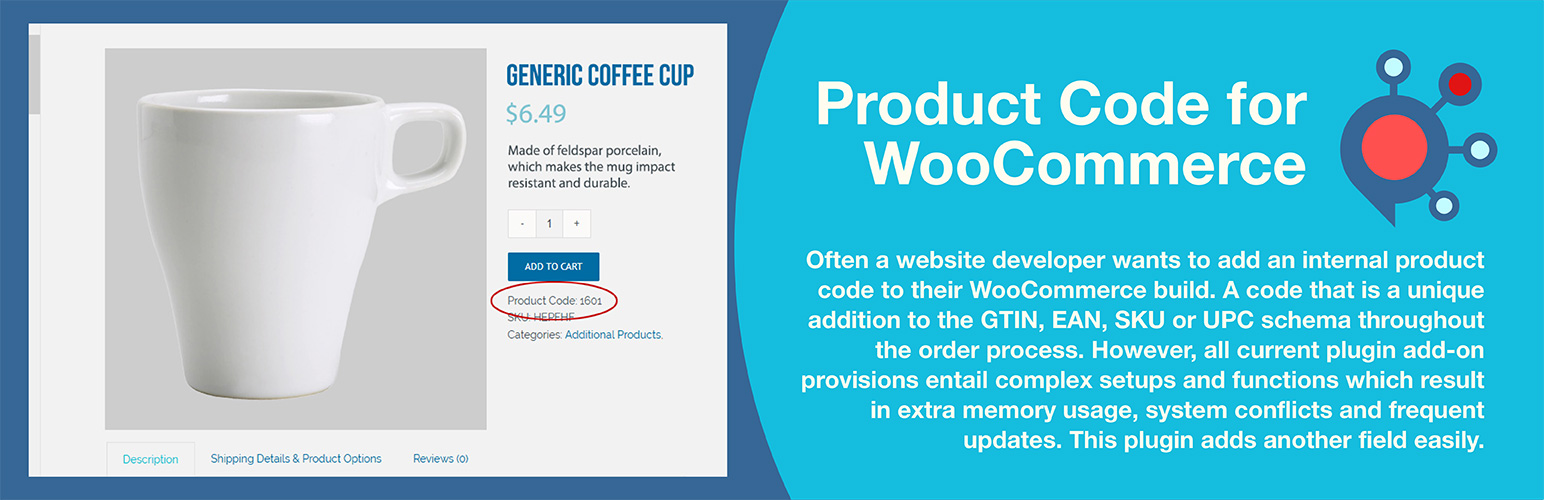
Product Code for WooCommerce is a WordPress plugin designed to add an additional product code field to WooCommerce products. It allows website designers, developers, and business owners to manage product identifiers for inventory control, stock numbers, or bin locations with ease. The plugin offers flexibility in displaying these codes, allowing users to choose when and where they appear during the order process.
The plugin supports both single and variable products, and users can customize field labels to fit their workflows. It is compatible with various search plugins and supports data import/export schemes, making it suitable for those who need to integrate product codes into Google Merchant feeds or structured data. The plugin is available for free and includes translations for multiple languages.
Best for: This plugin is suitable for WooCommerce users needing additional product code management for inventory or internal tracking.
What it does well
Where it falls short
Product Code for WooCommerce provides a straightforward solution for adding product codes, making it a practical choice for users with specific inventory management needs.
artiosmedia's own description of Product Code for WooCommerce, lightly tidied.
This user-friendly plugin is what many website designers, developers, and business owners look for when they need an additional product code field in WooCommerce. It is often used as an inventory control number, an internal stock number, or a bin location. The plugin allows you to add a product identifier to each variable or single item in WooCommerce. The custom field value can be passed through during order fulfillment and referenced from each item ordered. The field value can be viewed on the user side or turned off if desired.
Throughout the order process, a unique product code is often added in addition to the GTIN, EAN, SKU, and UPC. However, all current plugins that might address this need require complex setups and functions, resulting in increased memory usage, system conflicts, and frequent updates. This plugin eliminates all those hurdles by providing a simple solution without the bloat, without sacrificing the options WooCommerce doesn’t offer.
WooCommerce’s built-in product fields lack the flexibility many businesses require. This plugin fills those gaps with granular display controls—show codes to admins only, hide them on product pages while keeping them in cart and checkout, or hide them from customers entirely while preserving visibility on invoices and packing slips. A secondary code field accommodates businesses that need both a customer-facing code and an internal reference, such as a bin location. Customizable labels let you rename fields to match your workflow, and the option to hide empty fields keeps your product pages clean.
Simply install, enter your product codes within each product post (variation or single), and publish. There is nothing more to it than that! If you don’t want customers to see the unique product code, you can disable the user-side display in setup. The field label can also be easily changed in setup to read ISBN, Bin Number, Stock Number, EAN, or JAN. Any value can be created and entered as a single new field.
The added fields are compliant with mappable data import and export schemes. This exact compliance allows the fields to be included in a Google Merchant product feed using custom mapping. It also supports Schema.org/Product with an option to choose the property name (GTIN, EAN, UPC, ISBN) to set inside the structured data.
You can also search product codes using the WordPress default search from the user side and from the administrator WooCommerce product list page on the backend. It is compatible to search product codes using the popular Relevanssi, SearchWP and, Ajax Search Pro.
All text strings use WordPress translation functions. Includes complete translations for English, Spanish, French, German, Portuguese, Dutch, Polish, Finnish, and Russian. Any edits to the PO files or additional languages are welcome.
If this free effort assists you, please consider making a small donation from the main plugin page, found on the lower right. All funds assist orphans in destitution.
As of version 1.3.1, the Product Code primary field is now displayed by default in the WooCommerce product panel, and can be toggled off from the top tab dropdown if desired. If your second Product Code field is activated from settings, it will appear to the right of the Product panel. Additionally, the Product Code primary field now appears in the WooCommerce Quick Edit panel. Turn on the second Product Code, which will display after the primary field in the Quick Edit panel. Make sure you clear your caches (website and browser) if you are updating from the previous plugin.
As of version 1.4.1, an administrator can choose to hide the default and secondary product code from the user-side product posts while the other display injections still work (checkout, cart, and receipts).
Load time: 0.294 s; Memory usage: 3.63 MiB
PHP up to tested version: 8.3.29
MySQL up to tested version: 8.4.7
MariaDB up to tested version: 12.1
cURL up to tested version: 8.18.0, OpenSSL/3.6.0
PHP 7.4, 8.0, 8.1, 8.2, and 8.3 compliant. Not tested on 8.4 yet.
Other plugins for moving data.
The best WordPress membership and user role editor plugin. User Roles & Capabilities editor helps you rest...

Manage all your WordPress updates, including individual updates, automatic updates, logs, and loads more. This...

Redux is a simple, truly extensible, and fully responsive options framework for WordPress themes and plugins....

🌠 Shorten, brand, and track any URL on your own domain. Keep your links — and your data — where they belong....

Export WooCommerce orders to Excel, CSV, XML, JSON, PDF and HTML. Best free order export plugin for WooCommerc...

Easily export or import your WordPress customizer settings!