
WPThumbs
Themes Plugins By purpose By industry Best-of lists Fix it guides
Free Plugin by Per Søderlind v2.1.5

Virtual Media Folders

Virtual folder organization and intelligent management for the WordPress Media Library, without altering file locations on disk.
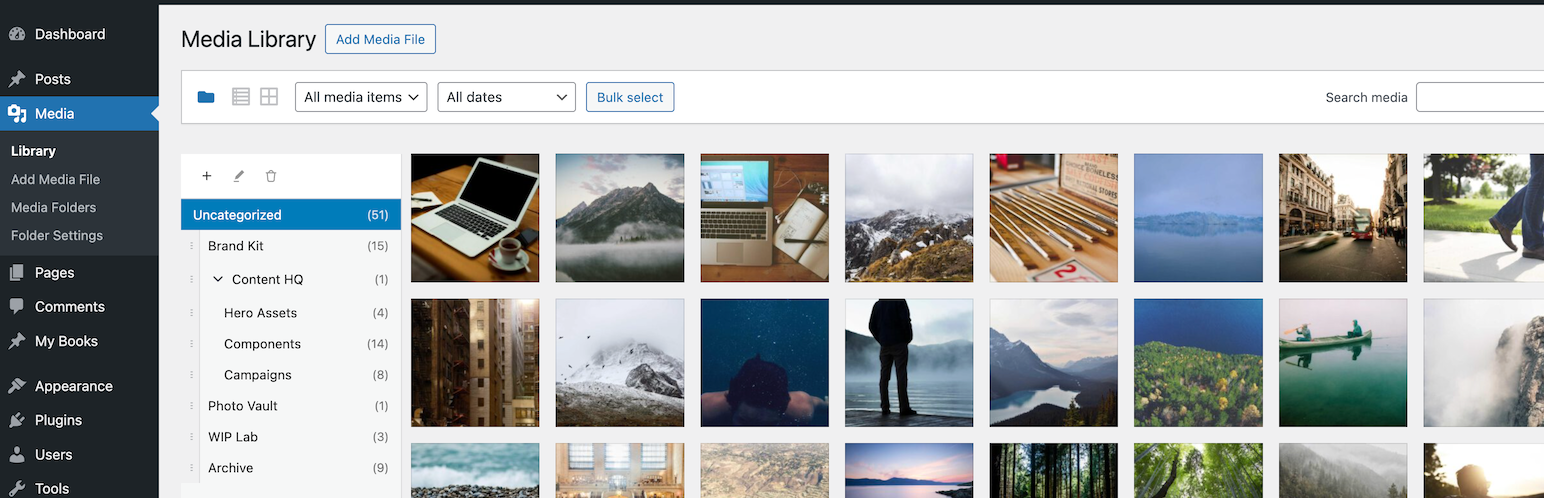
Virtual Media Folders

The facts

Rating
5★ from 2
Active installs
200+
Price
Free
Last updated
26 Aug 2026
Added
Dec 2025
Requires WP
6.8
Tested up to
WP 7.1
Requires PHP
8.3
Downloads
5,722

Our analysis

AI-assisted

Virtual Media Folders is a WordPress plugin that allows you to organize your media files into virtual folders within the Media Library. It creates a hierarchical folder structure without moving the actual files on the server, ensuring that URLs remain unchanged during reorganization.

The plugin features drag-and-drop functionality for easy file management, a sticky sidebar for navigation, and integration with the Gutenberg block editor. It is suitable for users who need to manage a large number of media files efficiently and want to maintain an organized library without altering file locations.

Best for: This plugin is best for WordPress users looking to efficiently manage and organize their media files.

What it does well

  • Creates hierarchical folder structures for media organization
  • Supports drag-and-drop functionality for moving files
  • Integrates with the Gutenberg block editor
  • Offers bulk actions for managing multiple media items
  • Provides full keyboard navigation support

Where it falls short

  • Limited information on additional features and add-ons

Verdict

Virtual Media Folders provides a straightforward solution for organizing media files in WordPress. Its features are particularly useful for users with extensive media libraries.

From the developer

Per Søderlind's own description of Virtual Media Folders, lightly tidied.

Virtual Media Folders brings virtual folder organization to your WordPress Media Library. Organize your media files into hierarchical folders without moving files on disk—folders are virtual, so your URLs never change.

Features

  • Virtual Folders – Create hierarchical folder structures to organize media
  • Drag & Drop – Easily move media between folders with drag and drop
  • Sticky Sidebar – Folder navigation stays visible while scrolling through media
  • Gutenberg Integration – Filter media by folder directly in the block editor
  • Bulk Actions – Move multiple media items at once
  • Keyboard Accessible – Full keyboard navigation support
  • Internationalized – Ready for translation (Norwegian Bokmål included)

Free add-ons

Add-On Manager lets you easily install and manage add-ons that extend Virtual Media Folders with powerful new features:

  • AI Ability – Registers MCP tools for AI agents via the WordPress Abilities API.
  • AI Organizer – Uses vision-capable AI models to analyze actual image content and automatically organize your media library into virtual folders. This is add-on functionality requiring an API key from a supported AI service provider, or a local LLM.
  • Editorial Workflow – Role-based folder access, move restrictions, and Inbox workflow.
  • Folder Exporter – Export folders (or subtrees) as ZIP archives with optional CSV manifests.
  • Media Cleanup – Tools to identify and clean up unused or duplicate media files.
  • Migrate – Migrate folder structures from other media folder plugins to Virtual Media Folders.
  • Rules Engine – Rule-based automatic folder assignment for media uploads, based on metadata, file type, EXIF or IPTC data.
  • Search – Fast, typo-tolerant search for the WordPress Media Library, powered by the Loupe Search engine.

How It Works

Virtual Media Folders uses a custom taxonomy to assign media to folders. This means:

  • Your media files stay exactly where they are on the server
  • URLs never change when you reorganize
  • Folders can be nested to create hierarchies

Usage

Organizing Media

  1. Go to Media > Library
  2. Click the folder icon to show the sidebar
  3. Use + to create folders
  4. Drag media onto folders to organize / Bulk select media and use the “Move to Folder” action
  5. Click a folder to filter the view

Settings

Go to Media > Folder Settings to configure:

  • Show “All Media” – Display “All Media” option in sidebar
  • Show “Uncategorized” – Display folder for unassigned media
  • Jump to folder after move – Navigate to target folder after moving
  • Default folder for uploads – Auto-assign new uploads to a folder

Block Editor

Read the full description on the official page →

Tagged as

Alternatives

Other plugins for AI features.

Yoast SEO

Real-time SEO guidance, schema, and AI built in. Help search engines and AI systems understand your content. A...

Free 10M+ installs 4.8★ (27,819)
WPForms

WPForms

98

The best WordPress contact form plugin. Drag & Drop form builder to create beautiful contact forms, paymen...

Free 5M+ installs 4.8★ (14,369)
Rank Math SEO

Grow your organic traffic and AI visibility with powerful SEO tools, XML sitemaps, Schema automation, and buil...

Free 4M+ installs 4.8★ (7,496)
Translate WordPress with GTranslate

Translate WordPress with Google Translate multilanguage plugin using AI translation. Complete multilingual SEO...

Free 900k+ installs 4.9★ (4,950)
All in One SEO

AIOSEO is the WordPress SEO plugin. Boost SEO rankings with AI SEO tools, schema, meta descriptions, XML sitem...

Free 2M+ installs 4.7★ (5,201)
Premium Addons for Elementor

Elementor Carousel, Mega Menu, Posts List/Slider, WooCommerce Widgets, Display Conditions, AI Abilities, Prema...

Free 600k+ installs 4.9★ (1,677)