
Members
94The best WordPress membership and user role editor plugin. User Roles & Capabilities editor helps you rest...
Free
300k+ installs 4.9★ (1,274)
Connect Gravity Forms with Google Sheets to export forms entries or save form submissions to Google Sheets in real-time.
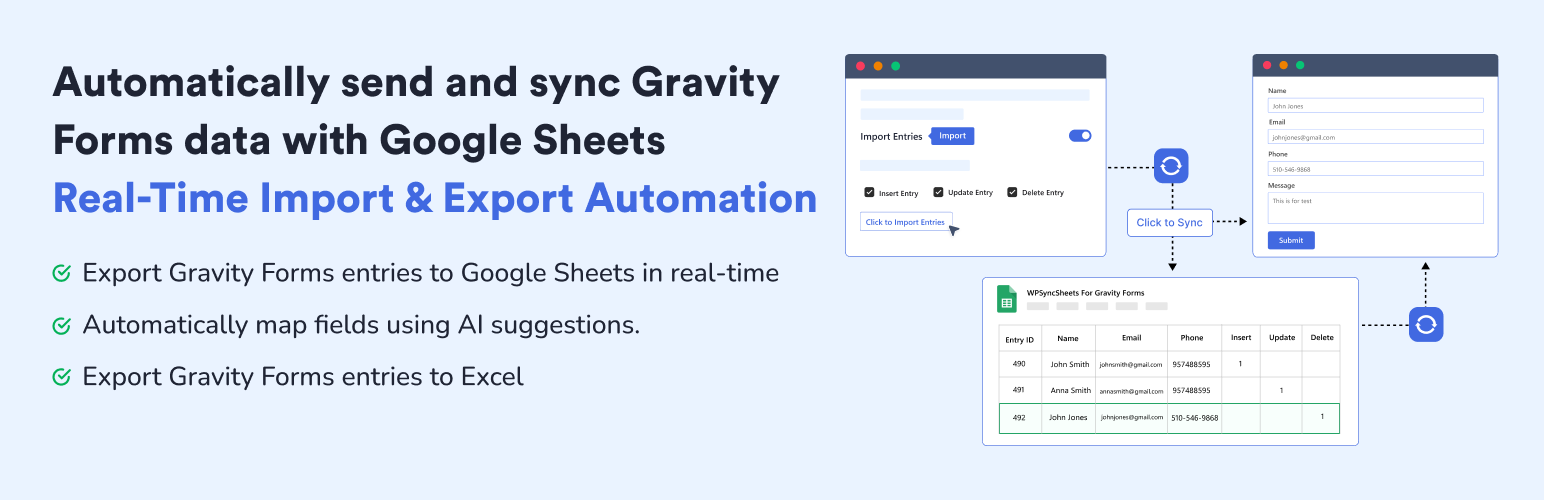
WPSyncSheets For Gravity Forms is a WordPress plugin that connects Gravity Forms to Google Sheets, allowing you to send form entries to Google Sheets automatically. It eliminates the need for manual data entry by mapping fields and creating spreadsheets in real-time, ensuring that your data is always up to date for reporting and analysis.
This plugin is suitable for users who need to manage form data efficiently, whether for backups, team collaboration, or data analysis. It provides a secure connection to Google Sheets without storing any Google account information, making it a straightforward solution for those using Gravity Forms.
Best for: This plugin suits users of Gravity Forms who want to streamline data management and reporting through Google Sheets.
What it does well
Where it falls short
WPSyncSheets For Gravity Forms offers a practical solution for automating data exports to Google Sheets, making it useful for those looking to enhance their form data handling.
Creative Werk Designs's own description of WPSyncSheets For Gravity Forms, lightly tidied.
WPSyncSheets For Gravity Forms – Send Gravity Forms entries to Google Sheets in real-time with zero manual effort. Automatically map fields using AI suggestions, auto-create sheets, and keep data synced for reporting, analysis, or backups without worrying about any loss of Gravity Forms entries data.
Gravity Forms Google Sheets Connector is bridge between WordPress plugin Gravity Forms and Google Sheets. This plugin allows you to map Gravity Forms fields to specific spreadsheet columns, create spreadsheets automatically, and keep your data always up to date. Whether you’re backing up submissions, managing form data, or sharing it with your team, this plugin makes the process fast, seamless, and scalable.
This plugin connect Google Sheets directly with Gravity Forms to automatically send entry values to Google Sheets. Gravity Forms entries to Google Sheets connection easily done without requiring any additional software or monthly fees, and with solid security and performance.
Demo | Sample Sheets | Docs | Support | Pro
Export Gravity Forms Entries to Google Sheets
WPSyncSheets For Gravity Forms plugin automatically export gravity forms entries and eleminated your manual data work time. It also secure Google Sheets connector and can store data like name, email, IP address, page URL, and submission date & time. Data is synced instantly using secure Google authentication, and no Google account or Drive data is stored by the plugin author.
Update Gravity Forms Entries from Google Sheets – Pro
Once the plugin exports Gravity Forms entries to Google Sheets, you can also update the entries from Google Sheets back to Gravity Forms. This helps you fix missing entry data, rename existing data, or add new entry data directly within Gravity Forms. It means the import gravity forms entries from google sheets feature helps keep your Gravity Forms data up to date.
Gravity Forms Export Entries to Excel
Exporting Gravity form data to Excel is a smart step for simplifying your workflow. And, also for growing your business smoothly. Manually exporting entries each time can be time-consuming. Automating the process with WPSyncSheets saves time and reduces errors.
Connect Gravity Forms to Google Sheets
Using Gravity Forms alone leaves you relying on its built-in entry list or manual CSV exports. If you want to collaborate, share leads with a team, analyze signups, or build reports, Excel-style CSVs aren’t enough. With Google Sheets, your form entries become instantly accessible. WPSyncSheets For Gravity Forms makes that connection seamless, without any manual CSV exports, coding, or fuss.
✅ All the features in the free plugin (entries export, create new google sheet, etc)
✅ Bulk Export Gravity Forms entries
✅ Export entries with date range option
✅ Import entries form Google Sheets to Gravity Forms
✅ Bulk Import Gravity Forms entries
✅ Schedule automatic imports of data from Google Sheets
✅ Schedule automatic export of data from Gravity Forms
✅ Conditional logic option for export the specific gravity forms entries
✅ Duplicate Feeds option for each Gravity Forms
✅ Payment Status option for paid/approved form entries based on the payment method
✅ Compatibility with WooCommerce Gravity Forms Product Add-Ons
✅ Compatibility with Gravity PDF
✅ Compatibility with Gravity View
✅ Compatibility with RedSys & Bizum Gateway for Gravity Forms
✅ Compatibility with Gravity Forms Survey Add-On
✅ Compatibility with Gravity Forms Stripe Add-On
✅ Compatibility with Gravity Forms Mollie Add-On
✅ Compatibility with Gravity Forms PayPal Checkout Add-On
✅ Compatibility with Gravity Forms Dropbox Add-On
✅ Compatibility with Gravity Forms Nested Forms
✅ Compatibility with Gravity Form Razorpay Add-On
You can check out the user guide to easily setup the plugin or watch the below video on GSheetConnector For Gravity Forms
WPSyncSheets connects WordPress and WooCommerce platforms with Google Sheets. Our mission is to help businesses automate data transfer, simplify operations, and reduce repetitive tasks through real-time, two-way data synchronization.
🔸 WPSyncSheets For WooCommerce: Import Export WooCommerce Orders, Products, Customers & Coupons.
🔸 WPSyncSheets For Elementor: Map & Sync Elementor Form Entries to Google Sheets in Real Time.
🔸 WPSyncSheets For Core: Import, Export & Bulk Edit WordPress Posts and Pages via Google Sheets.
Other plugins for moving data.
The best WordPress membership and user role editor plugin. User Roles & Capabilities editor helps you rest...

Manage all your WordPress updates, including individual updates, automatic updates, logs, and loads more. This...

Redux is a simple, truly extensible, and fully responsive options framework for WordPress themes and plugins....

🌠 Shorten, brand, and track any URL on your own domain. Keep your links — and your data — where they belong....

Export WooCommerce orders to Excel, CSV, XML, JSON, PDF and HTML. Best free order export plugin for WooCommerc...

Easily export or import your WordPress customizer settings!