
Ad Inserter
94Manage Google AdSense ads, banners, ad rotation, sticky widgets, AMP ads, ads.txt, tracking, header and footer...
Free
300k+ installs 4.9★ (2,428)
The easiest way to load ACF & SCF fields in WordPress blocks. Add your custom fields to the block editor instantly — no coding required!
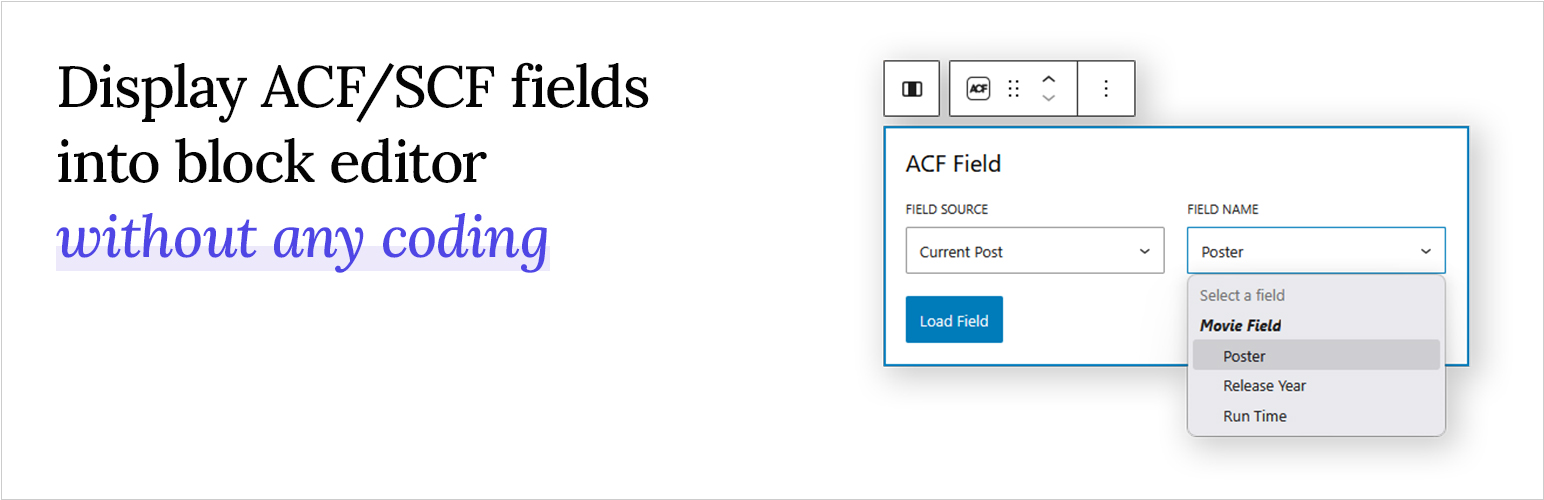
Blocks for ACF Fields is a WordPress plugin that allows you to display Advanced Custom Fields (ACF) and Secure Custom Fields (SCF) directly in the block editor. You can load various field types, including text, images, and links, using a single flexible block without needing to write any code.
The plugin is designed for users who want to integrate custom fields into their WordPress sites easily. It features a dropdown for selecting fields, flexible output control, and compatibility with full site editing, making it suitable for a range of customisation tasks.
Best for: This plugin is suitable for WordPress users looking to integrate ACF or SCF fields into their sites without coding.
What it does well
Where it falls short
Blocks for ACF Fields provides a straightforward solution for displaying custom fields in the block editor, making it a practical choice for users of all skill levels.
Gama Priambada's own description of Blocks for ACF Fields, lightly tidied.
Blocks for ACF Fields lets you effortlessly load and display Advanced Custom Fields (ACF) or Secure Custom Fields (SCF) inside the WordPress block editor using a single, flexible block. Whether you’re dealing with text, images, URLs, or complex field types, this plugin makes it simple — all without writing a single line of code.
Just create your custom fields with the ACF or SCF plugin, then open the WordPress block editor. Add the “ACF Field” block to your page or template, select the field you want to display from the dropdown, and you are done! Your custom field will now appear right inside the editor, exactly where you want it.
Want to see it in action? Watch the short demo video below to learn how it works in real time.
In addition to choosing which field to display, you also have control over how it appears. Text-based fields (including multiple-value fields like Select or Checkbox) can be shown as plain text or formatted with typography options. Image fields can be displayed as actual images with the same styling options as core Image blocks. For URL-return fields (such as Link or Post Object), you can render them as clickable buttons that automatically match your theme’s design.
You also have control over where your fields are sourced from, making it easy to connect content dynamically based on the template you’re editing.
Full documentation and usage guides are available at:
https://www.acffieldblocks.com/documentation/
Love the free version? PRO works exactly the same way — pick a block, pick a field, and you’re done. Nothing you’ve already learned changes. PRO simply gives you more to pick from: more supported field types, more layout options, and new ways to choose where your content comes from.
Sooner or later you’ll hit a field the free version can’t display on its own — a Repeater, a Gallery, a list of related posts, an interactive Map, or a nested Group. Normally that’s where the fun stops and the PHP begins. PRO lets you build all of it right in the editor instead. Here’s what you get:
Other plugins for custom content structures.
Manage Google AdSense ads, banners, ad rotation, sticky widgets, AMP ads, ads.txt, tracking, header and footer...

ACF helps customize WordPress with powerful, professional and intuitive fields. Proudly powering over 2 millio...

Checkout Field Editor (Checkout Manager) for WooCommerce – The best WooCommerce checkout manager plugin to man...

Easily reorder posts, pages, custom post types, and taxonomies with intuitive drag-and-drop sorting in the Wor...

The #1 user-rated activity log plugin for event logging, activity monitoring and change tracking.

Admin UI for creating custom content types like post types and taxonomies