WPThumbs
Themes Plugins By purpose By industry Best-of lists Fix it guides
Free Plugin by Premio v1.4.7

Coupon X

Boost sales with engaging discount pop ups, coupon widgets, promo code pop up & coupon codes! Generate unique promo codes or use existing codes 🛒
Coupon X

The facts

Rating
4.9★ from 52
Active installs
1k+
Price
Free
Last updated
13 Aug 2026
Added
May 2022
Requires WP
4.7
Tested up to
WP 7.1
Downloads
41,459

Our analysis

AI-assisted

Coupon X is a WordPress plugin designed to create discount code popups and announcement popups for WooCommerce websites. It allows you to engage visitors by offering unique or shared coupon codes, collecting email addresses, and reducing cart abandonment through targeted popups.

The plugin works by integrating with WooCommerce to generate discount codes and can be customised to display various types of popups. It is suitable for any WordPress site, particularly those using WooCommerce, looking to enhance conversions through promotional popups.

Best for: This plugin is best for WooCommerce store owners looking to increase sales and collect leads through discount popups.

What it does well

  • Creates engaging discount and announcement popups
  • Generates unique or shared coupon codes for visitors
  • Collects email addresses for future promotions
  • Works on any WordPress website with WooCommerce

Where it falls short

  • Limited information on advanced features in the free version

Verdict

Coupon X offers useful features for enhancing visitor engagement and conversion rates on WooCommerce sites. It provides a straightforward way to implement promotional popups without extensive setup.

From the developer

Premio's own description of Coupon X, lightly tidied.

Coupon X is a WordPress plugin that empowers your ability to convert more visitors into sales, leads, or email subscribers by creating engaging, beautiful, and highly-targeting discount code pop ups and coupon popups for website giveaways, coupons, promotions, discounts, and more.

Important: Coupon X will work on any WordPress website. You can create announcement popups and also collect emails using email pop ups (without creating any discounts or coupons). If you want to generate coupons and show them in your Coupon X pop ups, please make sure WooCommerce is installed and activated on your WordPress website. To create discount pop ups, you must ensure WooCommerce is active since the discount and coupon codes are based on WooCommerce.

🛒 How using Coupon X benefit your WordPress website & WooCommerce store

Using Coupon X you can create announcement emails, collect emails, generate unique discount codes for your visitors using our native WooCommerce integration, and use existing WooCommerce coupon codes and discounts.

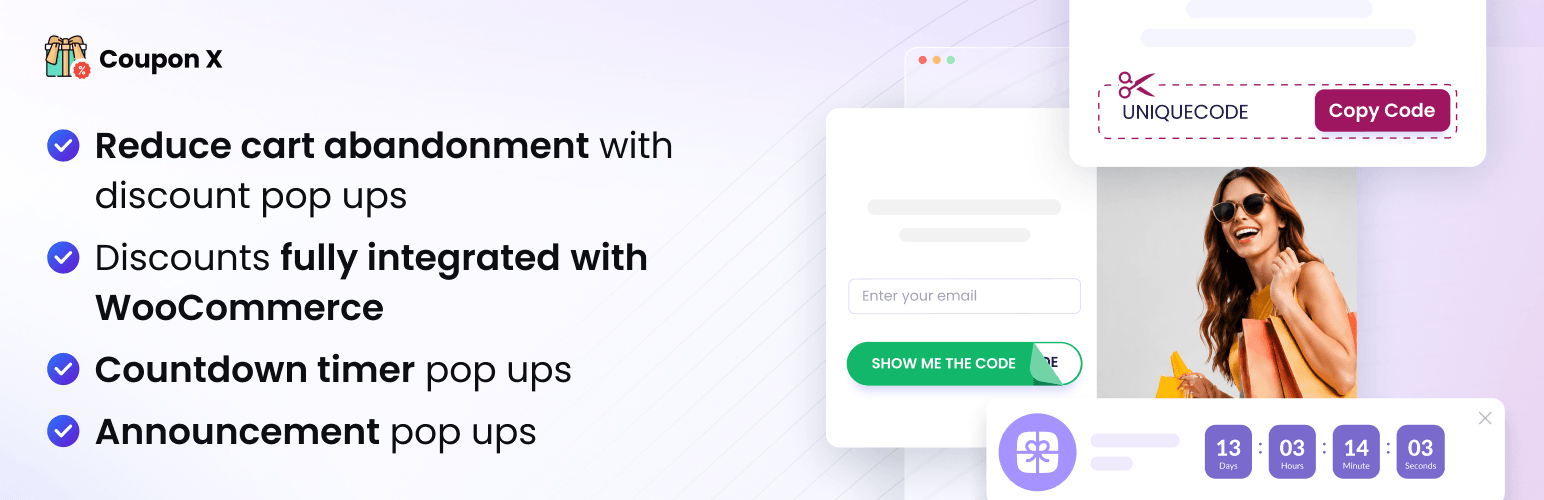
  • Show announcement pop ups and collect emails using email popups
  • Let visitors copy your coupon code from your discount pop up and use it in your checkout page
  • Collect email addresses and names of visitors so they can receive your exclusive promo codes directly via email
  • Launch a coupon code pop up when a visitor clicks on your popup teaser on the corner of your website
  • Reduce cart abandonment by using exit intent trigger on your coupon code popup

Try our robust Pro version and check out the Coupon X Pro Plans.

💪 How does Coupon X Work?

When you install the plugin, you’ll be able to customize your beautiful discount pop up or announcement pop up and decide if you want to create a unique coupon code for each visitor or use the same coupon code for all of your visitors. You can also create notification pop ups.

  • Generate a unique discount code for each visitor – if you select the unique discount code for each visitor option, then each of your website’s visitors will get a unique discount code pop up with a unique WooCommerce coupon code. You don’t need to create the discount code yourself, Coupon X will take care of it 🚀
  • Use the same discount code for all visitors – if you select the existing discount code option, then all your visitors will get the same promo code
  • Show a notification pop up and collect emails without showing a WooCommerce discount code
  • You can enable two step flow for your coupon code pop ups – show the coupon only when the visitors claim the coupon

🔥 What do you get in the Pro plan?

Unlock the Pro features for only $59 per year
You will get all the features of the free plan, plus:

  1. Unlimited discount pop ups – create unlimited discount pop ups and target them based on cart data, order history, page targeting, and country targeting.
  2. All pop up templates – create a lightbox pop up, slide-in popup, or floating bar layouts for your pop ups
  3. Countdown timer for your pop ups ⏳ – add a countdown timer element to your Coupon X pop up to increase conversion rate. You add a timer to a specific time and date, or just add count from the moment that the pop up appears
    4.Countdown timer pop up templates – choose from a variety of countdown pop up templates. Create an urgency sense for your discounts and coupon codes, and get more sales
  4. New! Send coupon codes via email – you can send a coupon code via email to your website’s visitors after they enter their email address
  5. Cart targeting – show your coupon pop ups based on the current cart data. For example, you can show a discount popup just for visitors with specific items in their cart, or based on the cart value
  6. Order history targeting – show discount popups if your customer has purchased a certain product or products, or if their purchase value is above or below a certain amount. You can show your discount pop ups to new customers only, or display coupon pop ups to customers who spent a certain amount or purchased a certain amount of items
  7. Native integrations with Mailchimp & Klaviyo – sync your discount pop ups email contacts with Mailchimp and Klaviyo
  8. Page targeting – show your promo code pop ups on specific pages (or don’t show them on specific pages) based on targeting rules like contains/exact/starts with/ends with
  9. Country targeting – show discount codes pop ups for specific countries
  10. Date & Day Scheduling – schedule your discounts and coupon popups to specific time, date, and day. Use this feature to offer time-limited coupons and discounts, or to start a promotion from a specific date
  11. Traffic source targeting – show your coupon pop ups only to visitors who come from specific traffic sources, including direct traffic, social networks, search engines, Google Ads, or any other traffic source
  12. OS and Browsers targeting – show discounts only to visitors who come from specific operating systems and browser

▶️ Live Demo of Coupon X

A live demo of the Coupon X plugin is available at Premio’s demo site.

🔗 Integrations With Mailchimp & Klaviyo

Pro feature: Integrate your Coupon X coupon pop ups with Mailchimp and Klaviyo. Whenever your visitors submit their email, you can sync it with Mailchimp and Klaviyo. Using these integrations with Mailchimp and Klaviyo you can send discounts and coupons through email.

Read the full description on the official page →

Tagged as

Alternatives

Other plugins for running discounts.

Discount Rules for WooCommerce

The discount plugin for WooCommerce helps you create bulk discount, quantity discount, storewide sale, dynamic...

Free 100k+ installs 4.9★ (1,355)
Wholesale Suite

WooCommerce wholesale plugin for serving wholesale & B2B customers. Adds wholesale pricing, user roles, dy...

Free 20k+ installs 4.8★ (544)
Coupon Affiliates

The most powerful affiliate plugin for WooCommerce. Track commission, generate referral URLs, assign affiliate...
Free 5k+ installs 4.9★ (76)