
Ad Inserter
94Manage Google AdSense ads, banners, ad rotation, sticky widgets, AMP ads, ads.txt, tracking, header and footer...
Free
300k+ installs 4.9★ (2,428)
The Custom Field Template plugin extends the functionality of custom fields.
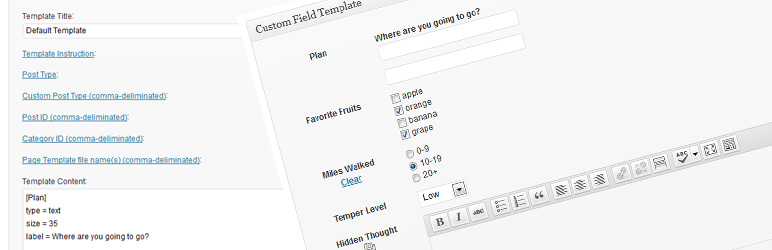
The Custom Field Template plugin allows you to add and manage custom fields on your WordPress posts and pages. It provides a template format similar to the rc:custom_field_gui plugin, enabling you to create multiple custom field templates and switch between them while editing content.
This plugin supports various features such as TinyMCE integration, media buttons, and custom CSS styling. It is designed for users who want to enhance their posts with additional metadata and custom fields without needing to edit any configuration files directly.
Best for: This plugin is suitable for WordPress users looking to manage custom fields efficiently.
What it does well
Where it falls short
The Custom Field Template plugin provides a robust solution for adding custom fields, making it useful for users needing enhanced post metadata management.
Hiroaki Miyashita's own description of Custom Field Template, lightly tidied.
The Custom Field Template plugin adds the default custom fields on the Write Post/Page. The template format is almost same as the one of the rc:custom_field_gui plugin. The difference is following.
We have finally published a manual site for the custom field template plugin. You can also use the custom field refinement search for posts in the admin panel. Please check here.
code = 0)level = 1)insertTag = true)output = true)valueLabel = apples # oranges # bananas)blank = true)type = break)sort = asc, sort = desc, sort = order)search = true.)outputCode = 0)editCode = 0)class = text)the_content(). (experimental)htmlEditor = true)onclick = alert('ok');)before = blah, after = blah)style = color:#FF0000;)maxlength = 10)multiple = true, startNum = 5, endNum = 10, multipleButton = true)text type. (date = true, dateFirstDayOfWeek = 0, dateFormat = yyyy/mm/dd)shortCode in order to output the shortcode filtered values. (shortCode = true)outputNone in case there is no data to output. (outputNone = No Data)singleList attribute in order to output with <ul><li> if the value is single. ex) singleList = truetype = file)type = fieldset_open, type = fieldset_close)Localization
If you have translated into your language, please let me know.
Are you interested in other plugins? See the following site CMS x WP.
Other plugins for custom content structures.
Manage Google AdSense ads, banners, ad rotation, sticky widgets, AMP ads, ads.txt, tracking, header and footer...

ACF helps customize WordPress with powerful, professional and intuitive fields. Proudly powering over 2 millio...

Checkout Field Editor (Checkout Manager) for WooCommerce – The best WooCommerce checkout manager plugin to man...

Easily reorder posts, pages, custom post types, and taxonomies with intuitive drag-and-drop sorting in the Wor...

The #1 user-rated activity log plugin for event logging, activity monitoring and change tracking.

Admin UI for creating custom content types like post types and taxonomies