WPThumbs
Themes Plugins By purpose By industry Best-of lists Fix it guides
Free Plugin by Editoria11y LLC v3.0.2

Editoria11y Accessibility Checker

Content accessibility checker written to be intuitive and useful for non-technical authors and editors.
Editoria11y Accessibility Checker

The facts

Rating
5★ from 5
Active installs
1k+
Price
Free
Last updated
25 Aug 2026
Added
Feb 2023
Requires WP
6.0
Tested up to
WP 7.1
Requires PHP
7.4
Downloads
23,753

Our analysis

AI-assisted

Editoria11y Accessibility Checker is a WordPress plugin designed to help authors and editors ensure their content meets accessibility standards. It provides real-time feedback as users type, highlighting issues directly in the Block Editor and Classic Editor, and offers site-wide reporting on accessibility problems.

The plugin runs tests in the browser, storing results on your own server, which keeps data private. It includes over 50 content tests that check for common accessibility issues, such as missing alt text for images and problematic link titles. This tool is aimed at content creators who want to improve the accessibility of their websites while working in WordPress.

Best for: Content creators and editors looking to enhance website accessibility.

What it does well

  • Provides real-time accessibility feedback
  • Checks rendered content in published pages
  • Offers inline corrections and plain language tips
  • Data is stored privately on your own server
  • Includes over 50 content tests for common accessibility issues

Where it falls short

  • Does not replace comprehensive testing tools
  • Limited information on additional developer tools

Verdict

Editoria11y Accessibility Checker is a useful tool for ensuring content accessibility in WordPress, particularly for those focused on improving their site's inclusivity. However, it should be used alongside other testing methods for thorough quality assurance.

From the developer

Editoria11y LLC's own description of Editoria11y Accessibility Checker, lightly tidied.

Editoria11y (“editorial accessibility ally”) is a multilingual, automatic, open source accessibility checker that provides live feedback as you work, with site-wide issue reporting and dismissals.

Editoria11y is built around four key needs for ongoing quality assurance, both before and after a site launch:

  • Tests run in real-time, offering inline corrections and advice as authors type in CKEditor in Gutenberg.
  • It checks rendered content in published pages and previews, allowing it to detect issues that only appear after Drupal assembles the content.
  • Tips use plain language, to both correct and teach.
  • All data is private. Tests run in-browser, and reports are stored on your own server.

Editoria11y is meant to supplement, not replace, testing with comprehensive tools and real assistive devices.

This plugin is the official WordPress implementation of the open-source Editoria11y library. Tests run in the browser and findings are stored in your own database; nothing is sent to any third party. It is meant to supplement, not replace, testing your code and visual design with developer-focused tools and testing practices.

Project supporters, through code contributions, testing, help translating or purchasing a license, can also enable a developer and auditor tools suite: ~50 additional tests for code and contrast problems, a custom test builder and a site crawler. We are at ~30% of our goal for 2026 support, which should be enough to sponsor work to add a link checker. Check the project roadmap for active projects and ideas for future work.

The authoring experience

Check out a demo of the checker itself.

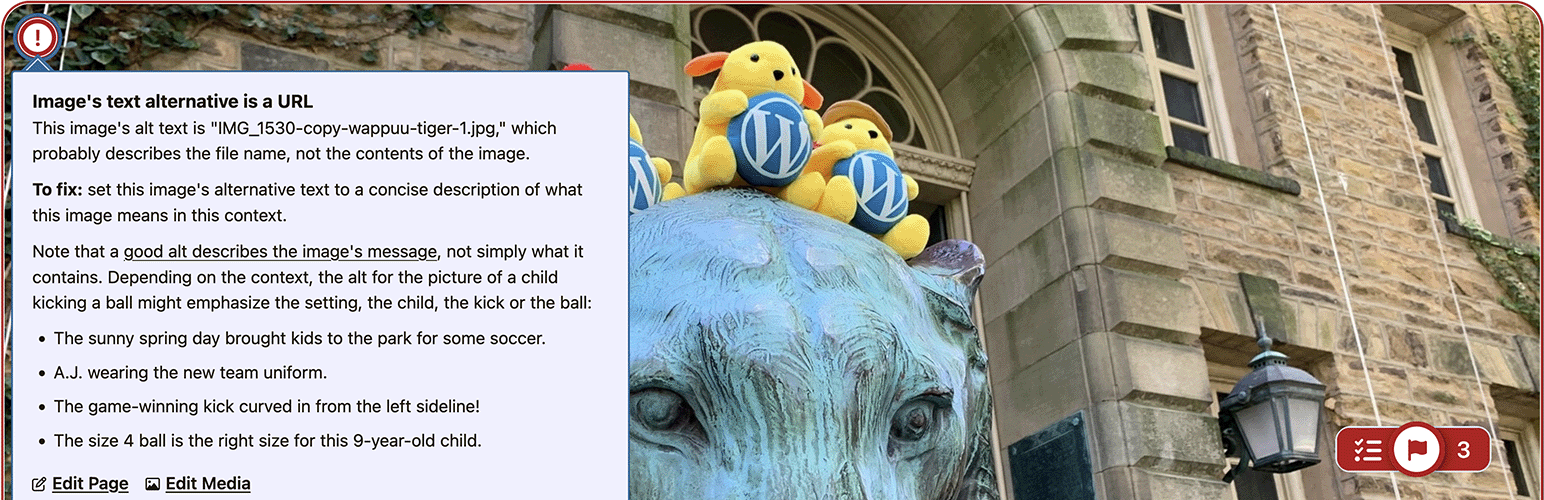
  • When logged-in authors and editors are viewing pages, Editoria11y inserts tooltips marking any issues present on the current page. Issues are also highlighted while editing in the Block Editor (Gutenberg) and Classic Editor (TinyMCE).
  • Tooltips explain each problem and what actions are needed to resolve it. Some issues are “manual checks,” which have buttons to ignore the check or mark the content as OK.
  • Clicking the main toggle shows and hides the tooltips.
  • The main toggle also allows authors to jump to the next issue, restore previously dismissed alerts, visualize text alternatives for images on the page (“alts”), view the document’s heading outline, and view site-wide detection lists.

The admin experience

  • Filterable reports let you explore recent issues, which pages have the most issues, which issues are most common, and which issues have been dismissed. These populate and update when published content is viewed by logged-in authors.
  • Various settings are available to constrain checks to specific parts of the page and tweak the sensitivity of several tests.

The tests

The 50+ content tests include

  • Text alternatives for visual content
    • Images with no alt text
    • Images with a filename as alt text
    • Images with very long alt text
    • Images with fake alt text to get around field validation (e.g. “TBD”)
    • Alt text that contains redundant text like “image of” or “photo of”
    • Images in links with alt text that appears to be describing the image instead of the link destination
    • Embedded visualizations that usually require a text alternative
    • Links with no text
    • Links titled with a filename
    • Links only titled with generic text: “click here,” “learn more,” “download,” etc.
    • Links that open in a new window without warning
    • Skipped heading levels
    • Empty headings
    • Very long headings
    • Suspiciously short blockquotes that may actually be headings
    • All-bold paragraphs with no punctuation that may actually be headings
    • Suspicious formatting that should probably be converted to a list (sequences of sentences that start with asterisks, emoji or incrementing numbers/letters)
    • Tables without headers
    • Empty table header cells
    • Tables with document headers (“Header 3”) instead of table headers

    Read the full description on the official page →

Tagged as

Alternatives

Other plugins for accessible sites.

WP Accessibility

WP Accessibility fixes common accessibility issues in your WordPress site.

Free 60k+ installs 4.8★ (68)
Image Alt Text

Add, edit, and bulk-generate alt text for every WordPress image, manually or automatically using AI. Fix image...
Free 9k+ installs 5★ (56)
Text To Speech TTS Accessibility

Free text to speech with browser voices + premium AI voices from Google, OpenAI & ElevenLabs. Add an audio...

Free 4k+ installs 4.8★ (91)