Create bulk, wholesale, and quantity-based pricing in WooCommerce with flexible tables, role-based pricing, an...
Free
10k+ installs 4.7★ (103)
Hide product prices and the Add to Cart button in WooCommerce with rule-based control. Perfect for B2B, wholesale, and catalog mode stores.
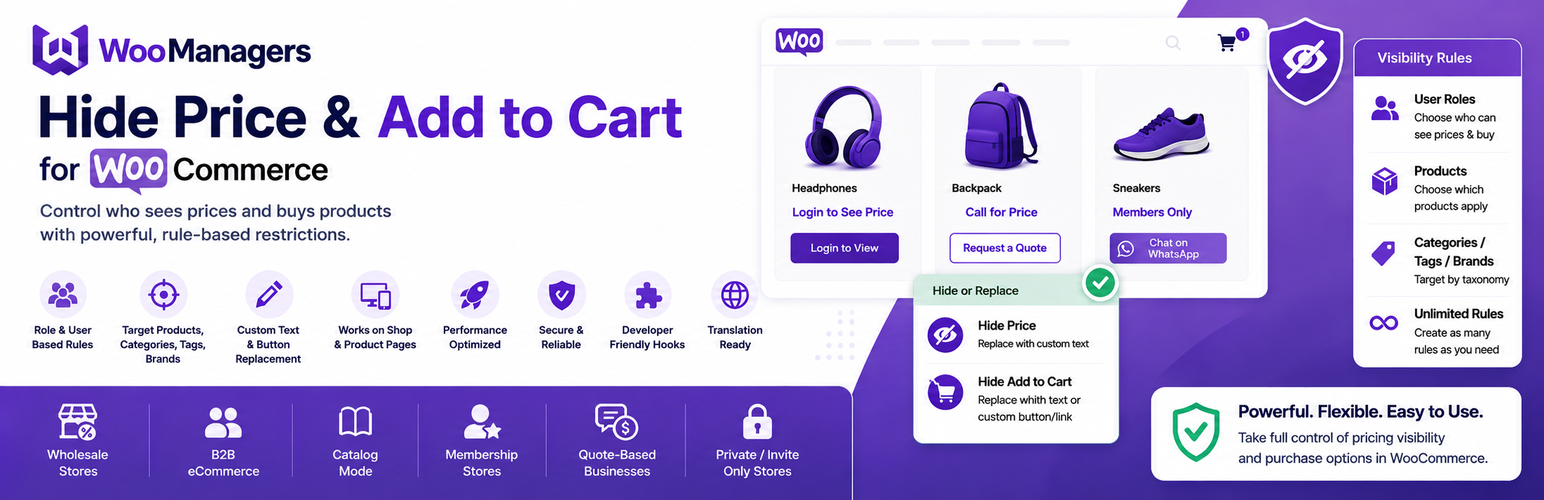
Hide Price and Add to Cart for WooCommerce is a WordPress plugin that allows store owners to control the visibility of product prices and the Add to Cart button based on user roles and other criteria. You can create unlimited rules to specify who sees prices and purchase options for different products, categories, or user types without needing to write any code.
This plugin is suitable for various business models, including wholesale stores, B2B shops, and members-only catalogs. It enables you to hide prices from guest users, show them only to approved customers, or replace the Add to Cart button with custom text or links, making it flexible for different selling strategies.
Best for: This plugin is best for WooCommerce store owners who need to manage pricing visibility based on user roles or specific conditions.
What it does well
Where it falls short
Hide Price and Add to Cart for WooCommerce provides a straightforward solution for controlling pricing visibility in online stores. It is particularly useful for businesses that require conditional access to pricing information.
Woo Managers's own description of Hide Price and Add to Cart for WooCommerce, lightly tidied.
Hide Price and Add to Cart for WooCommerce gives store owners full rule-based control over pricing visibility and purchase options — no coding required.
Create unlimited visibility rules and define exactly who sees prices and the Add to Cart button, and on which products. Each rule lets you target specific products, categories, tags, or brands, and apply it to specific user roles, individual users, or guest visitors.
Whether you’re running a wholesale store, a B2B shop, a members-only catalog, or a quote-based business — this plugin makes conditional pricing visibility simple and flexible.
Many WooCommerce stores need to control who can see prices and buy products. Common scenarios include:
Unlimited Hide Rules
Create as many rules as your store needs. Each rule is managed independently, giving you granular control across your entire catalog.
Hide Price with Custom Replacement Text
* Completely hide the product price
* Replace it with any custom text — e.g., “Login to See Price”, “Call for Price”, “Request a Quote”, or “Members Only”
* Leave the price area blank if preferred
Hide Add to Cart Button — Two Replacement Options
* Remove the Add to Cart button entirely
* Replace it with plain custom text (e.g., “Contact Us for Pricing”)
* Replace it with a styled custom link button pointing to any URL — your contact page, a quote form, a WhatsApp chat link, an email address, or any external page
Works on Shop Pages AND Single Product Pages
Rules apply both on archive/shop listing pages and on individual product pages, so your store looks consistent everywhere.
Supports All WooCommerce Product Types
Rules are applied correctly across simple products, variable products (including individual variations), grouped products, external/affiliate products, and WooCommerce Subscriptions.
Precise Product Targeting
Control which products each rule applies to:
* Apply to all products in your store with one click
* Target specific individual products
* Target entire product categories
* Target products by tag
* Target products by brand (compatible with brand taxonomy plugins)
Flexible User & Role Targeting
Control which visitors each rule applies to:
* Target specific individual user accounts by name
* Target any WordPress or WooCommerce user role — including Guests, Customers, Subscribers, Wholesalers, or any custom role
* If no user or role is specified, the rule applies to everyone
Results Cached for Performance
Rules are cached using WordPress object cache, so your store runs fast even with many rules active.
Developer-Friendly with Custom Hooks
Extend and customize the plugin’s behavior using built-in filters:
* woomanagers_replace_price_text — Filter the replacement text shown instead of the price
* woomanagers_replace_add_to_cart_text — Filter the replacement text shown instead of the Add to Cart button
* wmhp_hide_price_register_post_type — Customize the Hide Price Rules post type registration
Other plugins for quote requests.
Create bulk, wholesale, and quantity-based pricing in WooCommerce with flexible tables, role-based pricing, an...

NP Quote Request for WooCommerce enables your customers to easily submit quote requests to your WooCommerce st...

Request a Quote for WooCommerce and Elementor plugin shows a Contact Form 7 or WPForms popup on button click....
Plugin for WooCommerce. It includes the catalog mode in the store (there are no prices and the Buy button) and...

Best WooCommerce wholesale plugin with features like b2b wholesale prices, wholesale order form, tiered pricin...
YITH WooCommerce Catalog Mode, a plugin for disabling sales in your e-commerce and turn it into an e-commerce...