
The #1 user-rated activity log plugin for event logging, activity monitoring and change tracking.
Free
300k+ installs 4.7★ (488)
Logtivity is the activity log service for WordPress admins. Logtivity is a unified activity log platform that tracks activity and errors across all yo …

Activity Logs, User Activity Tracking, Multisite Activity Log from Logtivity is a WordPress plugin designed to monitor and track user activity across multiple WordPress sites. It records all actions and errors, providing alerts for significant events, which can be sent via email or Slack. The plugin is suitable for agencies and freelancers managing client sites, allowing them to maintain oversight without clients needing to know about the monitoring.
The plugin also features the ability to create charts from the activity log data, offering a visual representation of key metrics such as logins, purchases, and other events. Users can customize the date range for the charts, making it easier to analyse specific time periods. Logtivity is particularly useful for those who require detailed insights into user interactions on their WordPress sites.
Best for: This plugin suits agencies and freelancers managing multiple WordPress client sites.
What it does well
Where it falls short
Logtivity provides a comprehensive solution for tracking user activity and errors, making it a valuable tool for those overseeing multiple WordPress sites.
Logtivity Activity Logs's own description of Activity Logs, User Activity Tracking, Multisite Activity Lo..., lightly tidied.
When you set up Logtivity to monitor your WordPress sites, you can relax. We track everything that happens on the sites you maintain, and Logtivity also sends you alerts for important events!
Logtivity is a unified platform that tracks activity and errors across all your WordPress sites. We record everything that happens, and then send you alerts for important events! You can install Logtivity’s plugin and then use our service to keep a close eye on everything that happens on your sites.
If you work with clients, they never have to know that you’re using Logtivity. You can either show a white label version of the activity logs, or you can hide Logtivity entirely.
Logtivity provides the best activity logs for WordPress agencies. You can record all the user activity on your clients’ sites. Then you can use the activity log data to send notifications to email or Slack. Plus, you can easily search and export the information. And you can turn the activity log data into beautiful, useful charts.
If you have customers on your clients’ WordPress site, you’ll find Logtivity to be invaluable. Because Logtivity records all the important activity, you can see real customer journeys across the WordPress sites. This can be incredibly helpful for customer support: the activity log will show exactly what a user has done on your site.
To get started, simply install the Logtivity plugin and then connect your site to Logtivity. You’ll immediately start to see the results.
With Logtivity alerts, you can keep an eye on all your clients’ sites. You can set up flexible alerts for single sites or all your clients’ sites.
These notifications can go directly to your email inbox or to Slack channels.
If you have many sites, you can set up global alerts. For example, even if you have 100 sites, you only need to configure the alert once.
One Logtivity customer chooses to receive an email every time a plugin or theme is updated. Another WordPress agency has a Slack alert for every time an administrator logs in.
Logtivity is a WordPress activity log with a big difference. You can track all the activity on your clients’ sites, and you can also turn that information into beautiful and useful charts.
Displaying data in charts gives you a helpful and organized overview of your clients’ key metrics. You can use these charts to show logins, purchases, subscriptions, cancellations, downloads, or any other key events. If it happens in WordPress site, Logtivity can turn it into a bar chart or a line chart.
You can also customize the date range for charts. Your charts have advanced date ranges, so you can zoom in to view any time period.
Other plugins for monitoring a site.
The #1 user-rated activity log plugin for event logging, activity monitoring and change tracking.
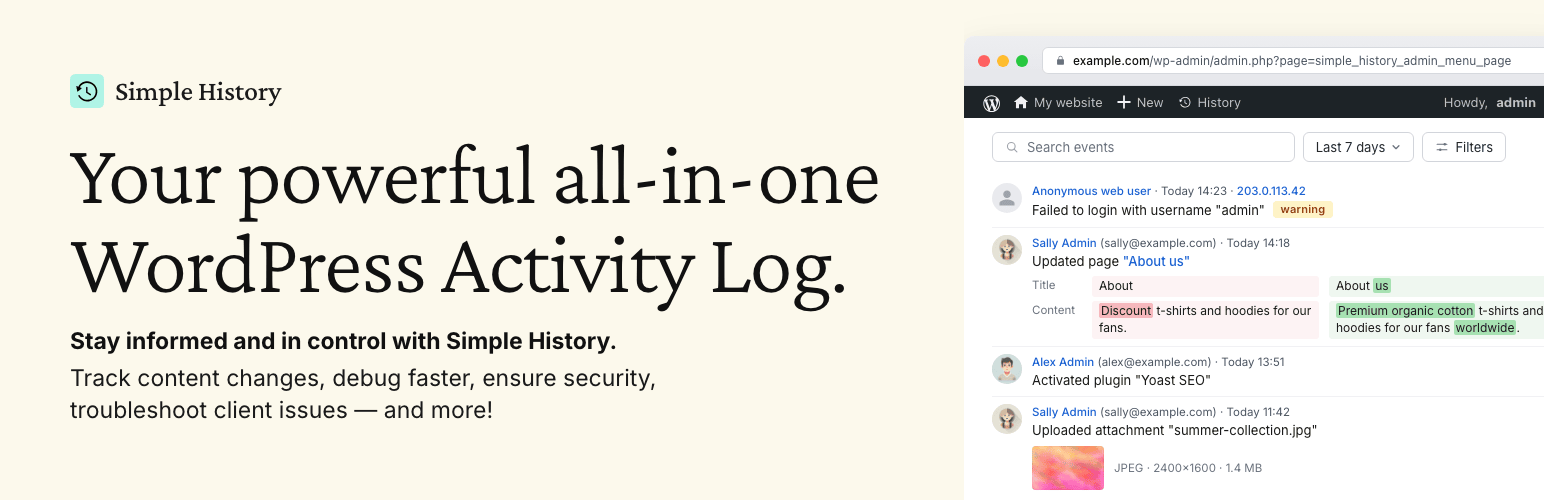
Track changes and user activities on your WordPress site. See who created a page, uploaded an attachment, and...

Manage 301 & 302 redirects. Simple redirection & redirects validation. Includes redirect stats & 4...

WordPress security plugin with malware scanner, IP blocking, audit logs, antivirus scans, firewall, 2FA, brute...

Redirect manager for 301, 302 and 307 redirection. Monitor and fix 404 errors, log every broken link and prote...

Everything you need to sell WordPress maintenance and manage multiple sites effortlessly: backup, update, upti...