WPThumbs
Themes Plugins By purpose By industry Best-of lists Fix it guides
Free Plugin by Brainstorm Force v1.0.6

Power Coupons for WooCommerce

WordPress coupon plugin for WooCommerce that auto-applies discounts with flexible rules and dynamic cart incentives—no codes required.
Power Coupons for WooCommerce

The facts

Rating
5★ from 3
Active installs
30k+
Price
Free
Last updated
25 Aug 2026
Added
Feb 2026
Requires WP
6.0
Tested up to
WP 7.1
Requires PHP
7.4
Downloads
180,734

Our analysis

AI-assisted

Power Coupons for WooCommerce is a WordPress plugin designed to enhance the coupon experience for WooCommerce stores. It enables store owners to create discount rules that auto-apply based on specific conditions, thereby simplifying the checkout process for customers.

This plugin is suitable for store owners who want to streamline promotions without relying on customers to enter coupon codes. It is particularly useful for brands focused on increasing average order value through dynamic discounts and for agencies managing multiple WooCommerce sites.

Best for: WooCommerce store owners looking to improve the coupon experience and increase sales through automated discounts.

What it does well

  • Auto-applies discounts without requiring coupon codes
  • Supports various discount rules based on cart conditions
  • Real-time updates to offers as the cart changes
  • User-friendly admin interface for managing rules
  • Lightweight design to reduce plugin overlap

Where it falls short

  • Limited feature information available
  • No details on planned features or updates

Verdict

Power Coupons for WooCommerce provides a straightforward solution for managing discounts in online stores. It may be beneficial for those seeking to enhance the customer checkout experience.

From the developer

Brainstorm Force's own description of Power Coupons for WooCommerce, lightly tidied.

Power Coupons is a WordPress coupon plugin built for WooCommerce stores that want discount rules, dynamic discounts, and auto-apply coupons—without turning the checkout into a “find the coupon field” scavenger hunt.

If you’ve ever run a promotion and still watched shoppers drop off at cart or checkout, it’s often not because the deal wasn’t good. It’s because the coupon experience was clunky:

  • The offer was buried in a banner.
  • The code was forgotten, mistyped, or never entered.
  • The cart didn’t clearly explain what qualifies.
  • Another discount tool conflicted, and nobody could tell why.

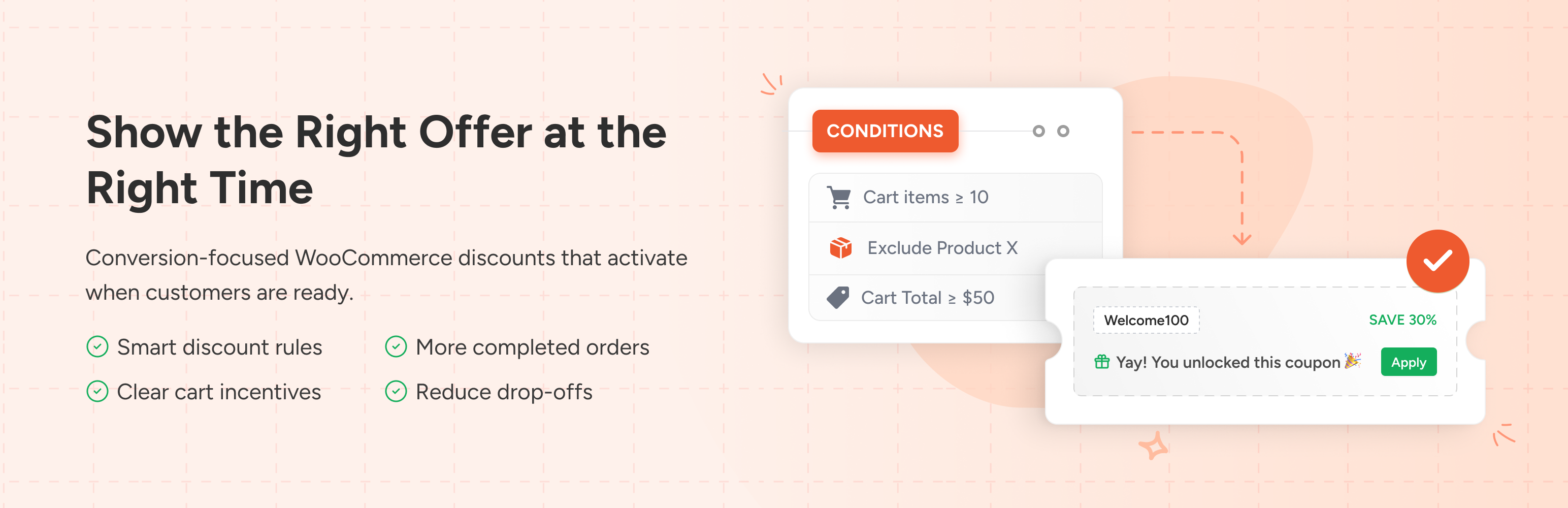
Power Coupons is designed to reduce that friction. Instead of relying on shoppers to enter codes, you can show eligible offers in-cart and apply discounts automatically when conditions are met. The result is a cleaner buying experience and promotions that are easier to manage (and easier to troubleshoot) over time.

Who is this for?

  • Store owners who want a WordPress coupon plugin that’s easy to set up and easy to audit later.
  • DTC and growing brands focused on increasing AOV with dynamic discounts and cart incentives.
  • Retail teams running frequent promotions who need rule-based discounts that don’t require codes.
  • Agencies managing multiple WooCommerce sites that want consistent discount logic and a clean admin experience.

What you can build with Power Coupons

Use simple conditions (cart subtotal, products, categories, quantity, combinations) to trigger offers at the right time. For example:

  • Auto-apply a discount when the cart subtotal crosses a threshold (great for “spend more” campaigns).
  • Apply a category-based coupon rule (e.g., discount only for a seasonal collection).
  • Run quantity-based deals (bulk discounts / quantity breaks) to increase basket size.
  • Show relevant offers in the cart so shoppers see what they can unlock before checkout.

How it works (quick overview)

  1. Create a discount rule and choose what triggers it (subtotal, products, categories, quantities, combinations).
  2. Set what happens when the rule matches (auto-apply coupon / discount behavior).
  3. Optional: exclude products or categories to protect margins.
  4. Test with a real cart to confirm the discount applies and updates as the cart changes.
  5. Launch your offer and let the cart do the work—no coupon codes required.

How to auto-apply your first discount (quick start)

  • Install and activate Power Coupons.
  • Go to WooCommerce > Coupons and create a new rule.
  • Choose a simple condition (e.g., cart subtotal above a set amount).
  • Save, then test by adding products to the cart until the condition is met.
  • If the discount doesn’t update immediately, exclude Cart and Checkout pages from caching and retest in an incognito window.

Key features

  • Auto-apply coupons (no codes needed): discounts apply automatically when conditions are met.
  • Discount rules for WooCommerce: build rule logic around cart total, products, categories, quantities, and combinations.
  • Dynamic discounts: offers update in real time as the cart changes, so shoppers always see what they qualify for.
  • Clean admin workflow: create and manage rules without an overwhelming “settings maze”.
  • Clean shopper UI: show only relevant offers in the cart to reduce friction and confusion.
  • Designed to stay lightweight: helps reduce plugin overlap by keeping coupon rules and cart incentives in one place.

Planned features (Roadmap)

Read the full description on the official page →

Tagged as

Alternatives

Other plugins for running discounts.

Discount Rules for WooCommerce

The discount plugin for WooCommerce helps you create bulk discount, quantity discount, storewide sale, dynamic...

Free 100k+ installs 4.9★ (1,355)
Wholesale Suite

WooCommerce wholesale plugin for serving wholesale & B2B customers. Adds wholesale pricing, user roles, dy...

Free 20k+ installs 4.8★ (544)
Coupon Affiliates

The most powerful affiliate plugin for WooCommerce. Track commission, generate referral URLs, assign affiliate...
Free 5k+ installs 4.9★ (76)