
Ad Inserter
94Manage Google AdSense ads, banners, ad rotation, sticky widgets, AMP ads, ads.txt, tracking, header and footer...
Free
300k+ installs 4.9★ (2,428)
A simple admin tool for inspecting rewrite rules.
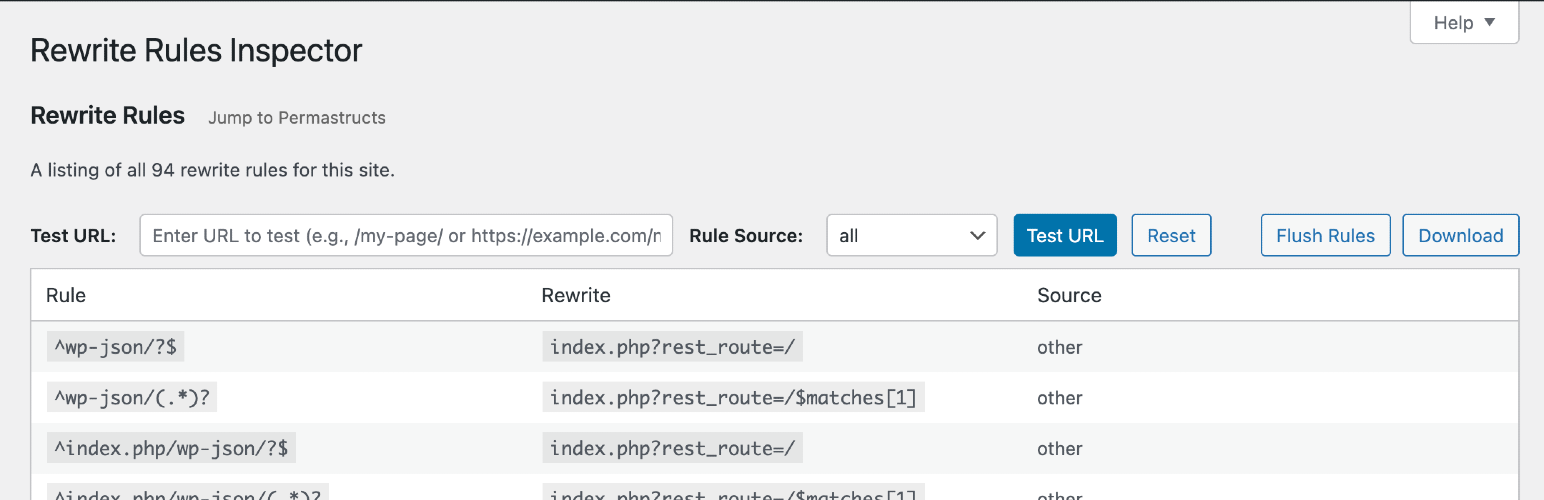
Rewrite Rules Inspector is a WordPress plugin that allows you to inspect and manage rewrite rules within your site. You can view a list of all rewrite rules, check which rules match a specific URL, and perform a soft flush to regenerate these rules. This tool is designed for users who need to understand and manage URL handling on their WordPress sites.
The plugin provides features such as a URL tester to check the matching rules for any given URL, a table of permastructs that WordPress recognises, and a flush rules function that regenerates rewrite rules based on your current settings. It is suitable for developers and site administrators who require detailed insights into their site's URL structure and rewrite rules.
Best for: This plugin suits WordPress developers and administrators managing complex URL structures.
What it does well
Where it falls short
Rewrite Rules Inspector is a straightforward tool for inspecting and managing rewrite rules in WordPress. It is particularly beneficial for users needing to troubleshoot or optimise their site's URL handling.
Automattic's own description of Rewrite Rules Inspector, lightly tidied.
A simple WordPress admin tool for inspecting rewrite rules. View a listing of all your rewrite rules, see which rewrite rules match a given URL (and the priorities they match in), or filter by different sources of rewrite rules. Perform a soft flush of your rewrite rules to regenerate them.
Developed on GitHub — pull requests are always welcome. Please leave feedback, questions, bug reports, and feature requests in the GitHub issues.
Go to Tools → Rewrite Rules in the WordPress admin.
Quickly test any URL (or path) against your site’s rewrite rules:
Works with full URLs or paths and automatically handles sites installed in a subdirectory.
Browse a table of all permastructs that WordPress is aware of, including:
The “Flush Rules” button allows you to regenerate your site’s rewrite rules. Here’s exactly what happens when you click it:
When you click the “Flush Rules” button, the following sequence occurs:
Security Check: The system verifies you have the proper permissions (manage_options capability) and validates the security nonce to prevent unauthorized access.
Cache Clearing: WordPress deletes the cached rewrite rules from the options cache using wp_cache_delete('rewrite_rules', 'options').
Rule Regeneration: WordPress calls flush_rewrite_rules(false) to regenerate all rewrite rules based on:
Hook Execution: The rri_flush_rules action hook is fired, allowing other plugins to perform additional cleanup or actions after the flush.
Success Feedback: You’re redirected back to the Rewrite Rules Inspector page with a success message confirming the rules have been flushed.
Other plugins for custom content structures.
Manage Google AdSense ads, banners, ad rotation, sticky widgets, AMP ads, ads.txt, tracking, header and footer...

ACF helps customize WordPress with powerful, professional and intuitive fields. Proudly powering over 2 millio...

Checkout Field Editor (Checkout Manager) for WooCommerce – The best WooCommerce checkout manager plugin to man...

Easily reorder posts, pages, custom post types, and taxonomies with intuitive drag-and-drop sorting in the Wor...

The #1 user-rated activity log plugin for event logging, activity monitoring and change tracking.

Admin UI for creating custom content types like post types and taxonomies