
Weight based shipping methods for WooCommerce. Flexible shipping with table rate rules by cart weight and orde...
Free
100k+ installs 4.9★ (703)
Allows you to customize the messages WooCommerce displays on the cart and checkout pages when no shipping methods are available.
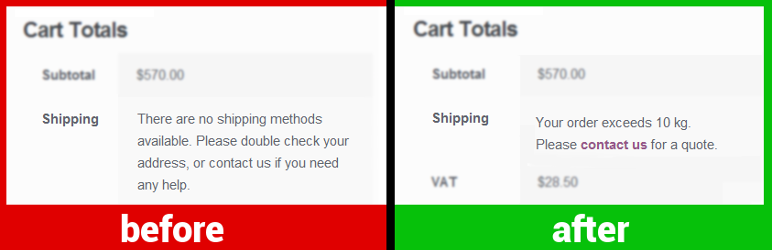
No Shipping Message for WooCommerce is a WordPress plugin designed to help you customise messages displayed to customers when shipping options are unavailable. It allows you to provide specific information about why shipping cannot be completed, such as destination restrictions or weight limits. This can enhance customer experience by guiding them on what to do next, like contacting you for assistance.
The plugin is suitable for WooCommerce store owners who want to improve communication regarding shipping issues. By using this plugin, you can ensure that customers receive clear and informative messages during the checkout process, which may help reduce confusion and abandoned carts.
Best for: WooCommerce store owners looking to enhance customer communication regarding shipping options.
What it does well
Where it falls short
This plugin offers a straightforward solution for customising shipping messages in WooCommerce. It can be beneficial for improving customer clarity during the checkout process.
Dan's own description of No Shipping Message for WooCommerce, lightly tidied.
The plugin allows quickly customizing the messages WooCommerce displays to the customer when shipping is not available:
1. “No shipping options were found” on the cart page (screenshot)
2. “There are no shipping options available” on the checkout page (screenshot)
3. “No shipping method has been selected” notice appearing after a checkout attempt (screenshot)
Customers see a no-shipping-options message when there are no delivery options configured for their order because they choose a destination you don’t ship to, or have too many items in the cart, or meet another edge condition. Providing a custom message may be useful to explain why shipping is not available and what to do next. You can also provide an actual link to your contact page.
Message examples:
Other plugins for shipping.
Weight based shipping methods for WooCommerce. Flexible shipping with table rate rules by cart weight and orde...

Auto-generate and attach WooCommerce PDF invoices and packing slips to order emails with customizable template...

Best WooCommerce coupons plugin to create advanced coupons and discount codes with auto-apply, BOGO, free ship...

The #1 WooCommerce shipment tracking plugin. Add tracking, auto-update order status, send branded emails. 1010...

Modern Cart gives your store a side cart and free shipping bar so shoppers stay on the page, spend more to unl...

Weight Based Shipping is a flexible and widely-used solution to calculate shipping costs based on the total ca...